January 10, 2007
In many applications, you can switch between open documents by using the keyboard shortcut Ctrl+Tab. WebPad.NET takes this to the next level, by giving you a nice overview of your open documents and Tool windows. Try holding down the Ctrl key and then press the Tab key to see the window. As long as the Ctrl key is down, the window remains open, allowing you to use some of the other keys to navigate through it. When you release the Ctrl key, the selected item is then activated (document or Tool window).
Press Tab again to select the next document. Hold down Shift as well, to select the previous document instead. You may also use the arrow keys to navigate between the open documents, or move focus to one of the Tool windows. You may also use the mouse to click on one of the items. Simply release the Ctrl key to activate it.
That's all :)
January 2, 2007
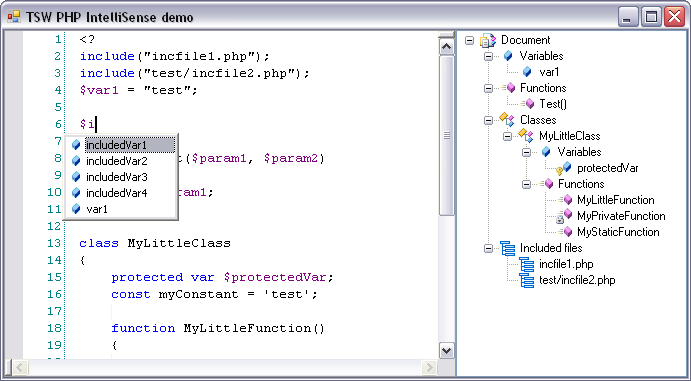
As I described in the last blog entry, the first thing I started working on, was the PHP IntelliSense feature. Actually, I started working on it before I had a "WebCoder.NET" project created and even before WebPad.NET was fully finished. My goal was pretty simple: To get at least the same level of PHP IntelliSense as in WebCoder 2005. I used a lot of the same ideas from WebCoder 2005, but I still had to write this from scratch, based on a new system. It took me less than half the time I originally used, to rewrite this. Now it mostly needs some polishing, and it already feels better than in WebCoder 2005. It's still not integrated into "WebCoder.NET", as you can see on the screenshot:
As I said, it's not completely done, but it's getting there, and soon I will be able to implement it into WebCoder. If you have any comments, based on how stuff works in WebCoder 2005, then please be sure to let me know - right now is the best time for me to look into any issues you might have with it :). Stay tuned for more information about "WebCoder.NET", I have several blog entries planned already :)
December 23, 2006
 ...and Happy New Year to all of you and your families. This has truly been an exciting year for TSW, but I do expect next year to be even more exciting! In 2007 you will see the next version of TSW WebCoder, which will combine all the great features you find in WebCoder 2005 and WebPad.NET. I have already made good progress on "WebCoder.NET", and without trying to hype it too much, I think it's safe to say that you may start looking forward to it. I hope to do some more blogging about it really soon, followed by some early screenshots within a couple of months. Until then, Merry Christmas & Happy New Year!
December 18, 2006
When starting on a new version, I usually do a lot of "demos". Small applications, showing a specific new feature. I'm not doing this to show it off, but simply to write as much code as possible in a less complicated environment. So I make these small applications, with no concern about design or anything. It's usually a form with a couple of non-aligned controls, all sorts of test output and buttons with their default captions - "button1", "button2" etc. While I do my very best to make WebCoder and WebPad.NET start as fast as possible, the couple of seconds it will take each time is simply too much, when I go into heavy write-compile-run-test-repeat mode :). The very first WebCoder-feature application I made was to see whether I could create the same PHP IntelliSense features that WebCoder 2005 has on the .NET platform. This was extremely important to me, since I find it to be a very important feature of WebCoder. Luckily, it turned out to be way easier than the first time I did, and the demo got to be pretty functional before I went to work on other things. I jump from demo to demo to make sure that all the really important things, the features that I simply wouldn't allow myself to release a new version of WebCoder without, is possible to do on this new platform.
This is a very exciting time, since I get to work on a bunch of interesting things. Once they get to the point where they simply need the last bit of polishing, which is usually the less-exciting part of making software, I move on to the next thing. When I'm satisfied, I start implementing these features into WebCoder, which is the best part. I get to see the hard work melt into WebCoder and the next version starts to take shape. I love it :)
December 15, 2006
As I stated in the first post of this blog, I would like to use it for more than the usual front page news. I have already posted a tip for WebPad.NET, and I hope to do more stuff like that in the future. Another thing that I wanted to use this blog for, is a diary for the development of future products, so you can check in to see how it's going with the "next big thing" from TSW :). This post marks the beginning of a series of posts which will tell you a bit about what I'm doing on the next version of WebCoder. I'm sure that you're not surprised to see that a new version of WebCoder is the next project, and you may start looking forward to it, because I think it's going to be really, really cool! However, as you can probably imagine, this won't be ready for release within the next couple of months. Building an application like WebCoder takes a lot of time, so please don't expect to see it finished tomorrow :)
Oh, and by the way: "WebCoder.NET" will work as a temporary name, since I'm not entirely sure what the exact name will be. I will be posting whenever I have some interesting news, so stay tuned for more information :)
November 27, 2006
One of the features that you might be missing in WebPad.NET are the tag dialogs, which you find in WebCoder. However, WebPad.NET is a light version, and I think the dialogs were an easy decision to leave out. If you really want them, WebCoder might still be a better choice for you, but I do wish to point out that WebPad.NET comes with a bunch of features to help you write tags faster. The obvious ones are of course AutoProposal and AutoComplete, which can make the process of writing a tag much faster. You could also create a user button, with the most common attributes included. In this blog I will use my own personal favorite approach, which is related to the brand new CodeSnippet functionality in WebPad.NET. If you haven't already done so, you should really go and check out the demo video of CodeSnippets.
Since a user I have been e-mailing with wanted a dialog for image tags in WebPad.NET, I will use the image tag as an example for this post. Please use the following steps to create an image tag CodeSnippet:
- Select Functions -> Manage Code Snippets
- Select HTML from the language dropdown
- Click the Plus button to create a new snippet
- Use the following properties: Title = Image tag, Shortcut = img and Code = <img src="$src$" alt="$alt$" />
- Press the Ok button. WebPad.NET will ask you to add the declarations. Click Yes.
- The Code Snippet Declaration dialog will pop up. You can edit the declarations to give them more saying names, default values and tooltips, but it's not required. Click Ok when you're done.
The Code Snippet has been created, and it's ready to use. The easiest way is to simply enter img in the editor field, and then press Tab. The tag will be inserted, and you are now in CodeSnippet mode. The first declaration will be highlighted, and you can enter a proper value for it. Use Tab to move to the next declaration. Once you're done, the press Enter and the tag will be complete, and the cursor will be positioned after the tag.
As you can hopefully see, CodeSnippets can be really powerful. You can create some for the tags you use the most, but the feature offers even greater potential, especially if you're using more complex languages like PHP. That's all for now, I hope you could use this post :)
November 13, 2006
Hello all,
 I'm very happy to tell you that TSW WebPad.NET has just been released! You can find more information about it, including screenshots and a couple of cool video demos, on the WebPad.NET product page. You will also find a download link for the trial version, which will allow you to try the application for 25 times. Remember that it requires the .NET framework to run, so unless you're running Windows Vista, you might need to download the framework as well. More information can be found on the .NET info page.
As you may have noticed, a couple of the pages here at tsware.net has been updated too, with new information as well as a new look. I hope you will like it all. If you have any comments, be sure to let us know :)
WebPad.NET is a brand new application, and while it has been tested by lots of betatesters for the last couple of months, bugs may still exist. If you find any, then please contact us with as many details as possible, and we will look into it.
That's all for now. Enjoy WebPad.NET! :)
November 7, 2006
The next final beta is now ready for download. Be sure to let me know about any problem you may find, so we can try to resolve it before the final release :)
WebPad.NET is based on and requires the .NET framework to run. Please see the following page if you're not absolutely sure that you have the latest version of the .NET framework: NET info page.
All feedback is much appreciated in the beta forum!
Download TSW WebPad.NET Final beta 5
October 25, 2006
The next final beta is now ready for download. As you will probably notice, I have extended the beta period within it for some extra days. I'm doing this to make sure that we get rid of as many bugs as possible, before the release, so once again I would like to urge you to report any problems you find :)
WebPad.NET is based on and requires the .NET framework to run. Please see the following page if you're not absolutely sure that you have the latest version of the .NET framework: NET info page.
All feedback is much appreciated in the beta forum!
Download TSW WebPad.NET Final beta 4
October 19, 2006
I've got a new beta version for you already. Final beta 3 is now ready for download, mostly with minor bugfixes. Check it out, and let me know what you think of it :)
WebPad.NET is based on and requires the .NET framework to run. Please see the following page if you're not absolutely sure that you have the latest version of the .NET framework: NET info page.
All feedback is much appreciated in the beta forum!
Download TSW WebPad.NET Final beta 3